
SAP Analytics Cloud: The Complete Guide to Features, Planning, and Consulting Services
If your reporting still lives in a patchwork of spreadsheets, static dashboards, and disconnected planning tools, you already know the cost: slow month end closes, numbers that don’t match across departments, and decisions made on outdated data. SAP Analytics Cloud (SAC) was built to close that gap bringing business intelligence, planning, and predictive analytics together in a single cloud platform that sits directly on top of your SAP and non SAP data.
From interactive dashboards and self-service reporting to budgeting, forecasting, AI powered analytics, and executive reporting, SAP Analytics Cloud helps organizations turn data into faster, more informed decisions. By combining analytics and planning on a shared data foundation, SAC reduces manual work, improves visibility across departments, and enables teams to act on real time insights rather than historical reports.
In this guide, you’ll learn what SAP Analytics Cloud is, explore its core features and capabilities, understand how SAC planning fits into the broader SAP landscape, and discover the key considerations for data connectivity, architecture, and implementation. We’ll also examine common adoption challenges, compare SAC with traditional SAP BI tools, and explain why many organizations rely on SAP Analytics Cloud consulting services to design, implement, and optimize their SAC environment for long term success.

What Is SAP Analytics Cloud (SAC)?
SAP Analytics Cloud is SAP’s cloud native analytics platform that combines three functions that used to require three separate tools: business intelligence and reporting, financial and operational planning, and predictive/AI driven forecasting. Because it runs entirely in the browser, there’s no separate client software to install, and it connects to data wherever it lives inside SAP systems like S/4HANA and BW/4HANA, or outside them, in non SAP databases, cloud applications, and flat files.
For companies already running SAP S/4HANA or SAP BW/4HANA, SAC typically becomes the front end layer: the place where finance, operations, and business teams actually view, build, and interact with reports, rather than working directly in the backend system.
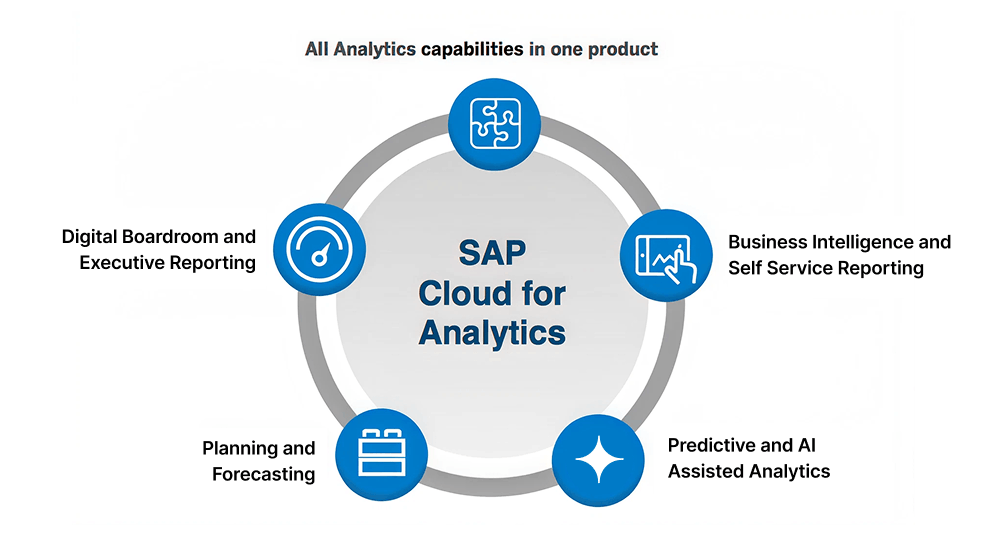
Core Capabilities of SAP Analytics Cloud
-
Business Intelligence and Self Service Reporting
-
Planning and Forecasting
-
Predictive and AI Assisted Analytics
-
Digital Boardroom and Executive Reporting
SAP Analytics Cloud Planning: How It Fits Into the Bigger Picture
-
Financial planning
-
Sales and operations planning
-
Workforce and cost center planning
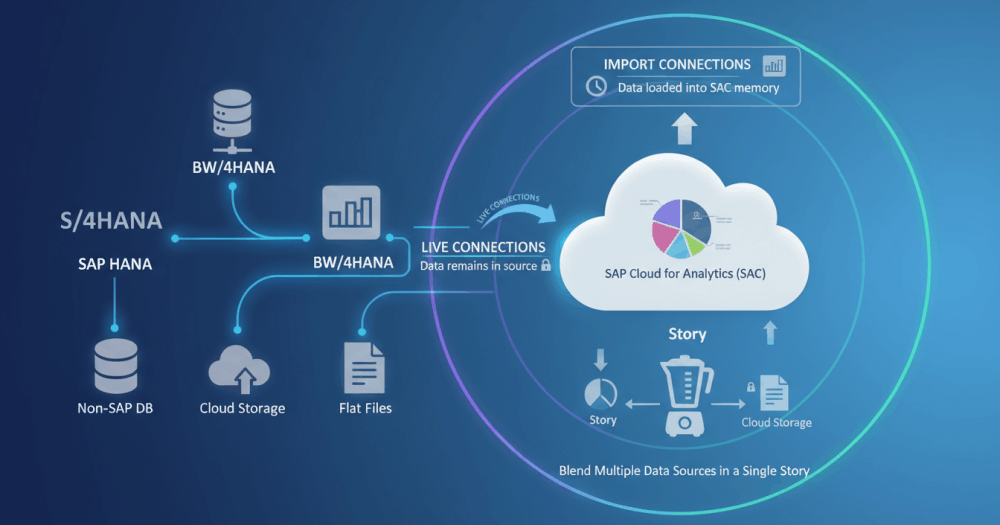
SAP Cloud for Analytics: Data Connectivity and Architecture
-
Import connections
-
Live connections
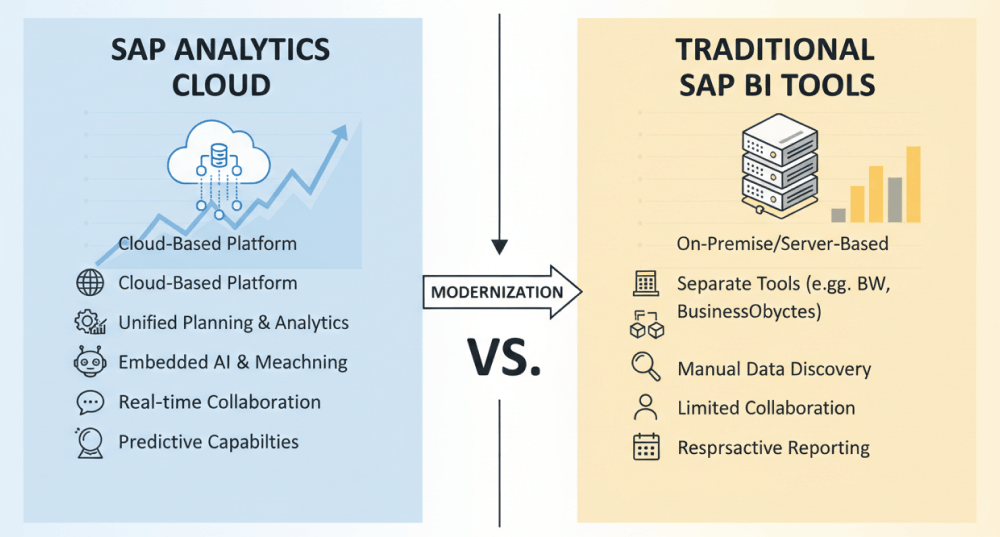
SAP Analytics Cloud vs. Traditional SAP BI Tools
Companies migrating from SAP BusinessObjects, Lumira, or classic BW reporting often ask how SAC compares. The short answer: SAC consolidates what used to require multiple tools. Where a legacy landscape might combine BusinessObjects for reporting, BPC for planning, and a separate predictive engine, SAC handles all three natively, on one data model, accessed through a browser. The trade-off worth planning for is that certain planning functions require separate licensing, and any migration from an existing BW or BPC landscape needs a clear data model and authorization strategy from day one which is where a consulting partner earns its keep.
Who Actually Needs SAP Analytics Cloud
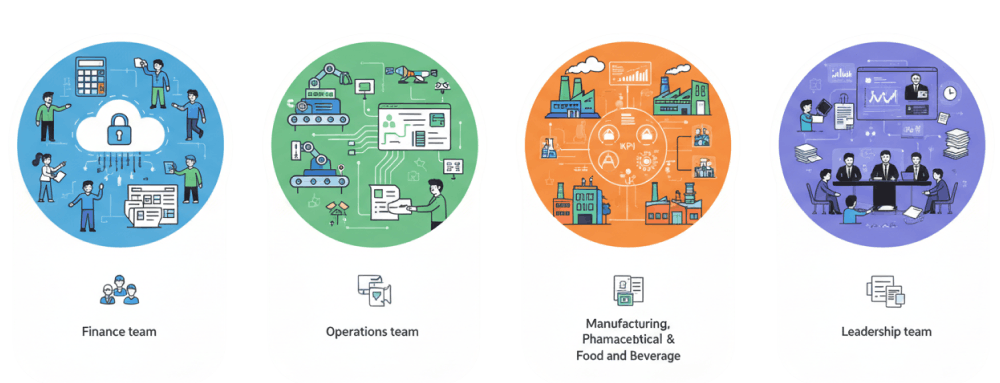
SAC delivers the most value for organizations that already run SAP S/4HANA or SAP BW/4HANA and need one of the following:
Finance teams
Replacing spreadsheet-based budgeting and forecasting with a governed, auditable planning process
Operations teams
That need production, supply chain, or quality data visualized without waiting on IT to build a new report each time
Manufacturing, pharmaceutical, and food and beverage
Companies managing complex, regulated, or multi-plant reporting requirements where consistent, validated KPIs across sites matter more than one-off dashboards
Leadership teams
That currently receive management information as static PDFs or slide decks rebuilt manually every month
SAP Analytics Cloud Consulting: Why It Matters More Than the License
-
Requirements and data modeling
-
Story and dashboard development
-
System connectivity setup
-
Authorization and governance
-
Post go live support
SAP Analytics Cloud Services and Solutions from RNB Consulting GmbH
-
Assessment and roadmap
-
Implementation and data modeling
-
Dashboard and planning application development
-
Training
Common Challenges in SAC Adoption and How the Right Partner Solves Them
Our data model wasn’t built for how we actually plan
This usually stems from replicating an old spreadsheet structure into SAC instead of redesigning it around the platform’s strengths. A consulting partner assesses the target processes first and builds the model to match not the other way around.
We don’t know if we should use live or import connections
This isn’t a one size fits all decision, and getting it wrong early means rework later. It depends on data volume, refresh frequency, and governance requirements, something worth reviewing system by system before implementation starts.
Business users still come back to IT for every change
This typically points to a training gap, not a tool limitation. SAC is designed for self-service, but only if users are trained on the platform’s actual logic, not just shown a finished dashboard.
Reporting is inconsistent across our plants or business units
This is common in manufacturing and multi-site operations, and it’s a modeling and governance issue solved by a shared data model and authorization structure, not by adding more dashboards.

Why Work With RNB Consulting GmbH on SAP Analytics Cloud
RNB Consulting has focused on SAP S/4HANA and SAP analytics since 2014, drawing on more than 30 SAP consultants and partners with 12 years of hands-on SAP experience across backend systems (S/4HANA, BW/4HANA, embedded BW, HANA, data migration) and frontend tools (SAC, Fiori, AFO, Lumira, Query Designer). That combination matters for SAC specifically: a reporting and planning layer is only as good as the backend data model underneath it, and RNB’s teams work across both.
The firm’s delivery model also includes structured after-go-live support, so a SAC implementation doesn’t end at deployment models, dashboards, and planning applications continue to be monitored and refined as reporting needs change. This is backed by an established network of specialist partners covering process consulting, technical implementation, and documentation, giving clients access to a broader bench of SAP expertise than a single-consultant engagement typically offers.
Ready to Put SAP Analytics Cloud to Work?
Whether you’re replacing spreadsheet-based planning, consolidating scattered reporting tools, or extending an existing S/4HANA or BW/4HANA investment, the technology decisions you make early data modeling, connection type, governance shape how much value you get out of SAC long after go live. RNB Consulting GmbH’s SAP Analytics Cloud services cover that full journey, from initial assessment through implementation, training, and ongoing support.
min read
ON THIS PAGE
- What Is SAP Analytics Cloud (SAC)?
- Core Capabilities of SAP Analytics Cloud
- The Strategic Role of SAC Planning
- Data Connectivity & Architecture
- SAC vs. Traditional SAP BI
- Who Benefits Most?
- Consulting vs. Software Licenses
- Our SAC Services & Solutions
- Adoption Challenges & Solutions
- Why Choose RNB Consulting?
Frequently Asked Questions
Does SAP Analytics Cloud replace our existing SAP BW system?
No. SAC is typically layered on top of BW/4HANA or S/4HANA as the reporting and planning front end, connecting via live or import connections. Your existing data warehouse usually stays in place.
How long does a typical SAC implementation take?
This depends heavily on scope a focused reporting rollout for one department looks very different from an enterprise-wide planning implementation. An assessment phase is the fastest way to get a realistic timeline for your specific requirements.
Do we need to migrate our data to the cloud to use SAC?
Not necessarily. Live connections let SAC query your source systems directly, so data can stay in your existing SAP landscape rather than being replicated into the cloud.
Is SAC planning a separate license from SAC reporting?
Planning functionality is typically licensed separately from core reporting, so it's worth clarifying the licensing scope during the assessment phase rather than after implementation begins.
Can SAC connect to non SAP data sources?
Yes. Alongside SAP systems, SAC connects to non-SAP databases, cloud applications, and flat files, and can blend multiple sources within a single dashboard.
Related Blogs

SAP Change Management: Why SAP Projects Really Fail Most SAP projects are not derailed by bad code, missing configuration, or...
min read

Choosing the Right SAP Implementation Partner: A Complete Evaluation Guide An SAP implementation is one of the largest technology investments...
min read

SAP Reporting Tools: A Complete Overview for Enterprise Reporting Every SAP driven organization eventually hits the same wall: transactional data...
min read

SAP Master Data Management Best Practices: A Practical Framework Master data problems rarely announce themselves. They show up as duplicate...
min read
SAP Analytics Cloud: The Complete Guide to Features, Planning, and Consulting Services If your reporting still lives in a patchwork...
min read